
Closer Chad2m
I just found out my girlfriend is cheating on me. Here's what it taught me about B2B sales 🧵
Your agent answered you in 30 seconds. You came back 10 minutes later, after scrolling X. Doomscroll Stopper is a free Chrome extension that hides the X feed. Posting still works.
Free. No email. No signup. 16 KB, which is smaller than the average reply guy's take.
💻 Desktop only. Chrome extensions don't run on phones.
Trending in Business
#GirlfriendLessonsTrending
Sleep is a skill issueLive on X
Founders yelling, 4.2K listeningWho to follow
Closer ChadDoomscroll math
Two questions. Answer honestly. Feel bad.
How long do you typically spend scrolling?
Every time you send a prompt and wait.
Your working year. White squares are days spent scrolling.
What it does
Need the feed back for a minute? Click the icon. A grey OFF appears, the feed returns. Click again and it's gone. We trust you. Mostly.
 OFF
I just found out my girlfriend is cheating on me. Here's what it taught me about B2B sales 🧵
I replaced my entire team with AI agents. Revenue has collapsed. Here are 5 lessons.
Unpopular opinion: sleep is a skill issue.
My 4-year-old just closed her first enterprise deal. Here's her framework.
We just hit $10M ARR* 🚀 (*annualized from our best Tuesday)
I wake up at 3:45am. Not because I have to. Because the market doesn't sleep. (I also don't sleep.)
Hiring: junior dev. 15 years of experience. Unpaid. Must love family. 🙏
My barista spelled my name wrong. Here's what it taught me about personal branding.
I cried in a WeWork phone booth today. Anyway, we're hiring.
Quit my job to build in public. Building: nothing yet. Public: very.
Set it up in about two minutes
It isn't in the Chrome Web Store, so you load it yourself. Chrome makes this sound scary. It isn't. You're about to become a "developer". Update your LinkedIn.
Step 1
Click the button below, then double-click doomscroll-stopper.zip. You get a folder called doomscroll-stopper.
Move that folder somewhere you won't delete it, like Documents. Chrome reads it every time it starts. Delete the folder, the feed comes back. Like a bad ex.
Download the zipStep 2
Paste this into the address bar and press Enter:
Using Brave, Edge or Arc? Same thing: brave://extensions, edge://extensions, arc://extensions.
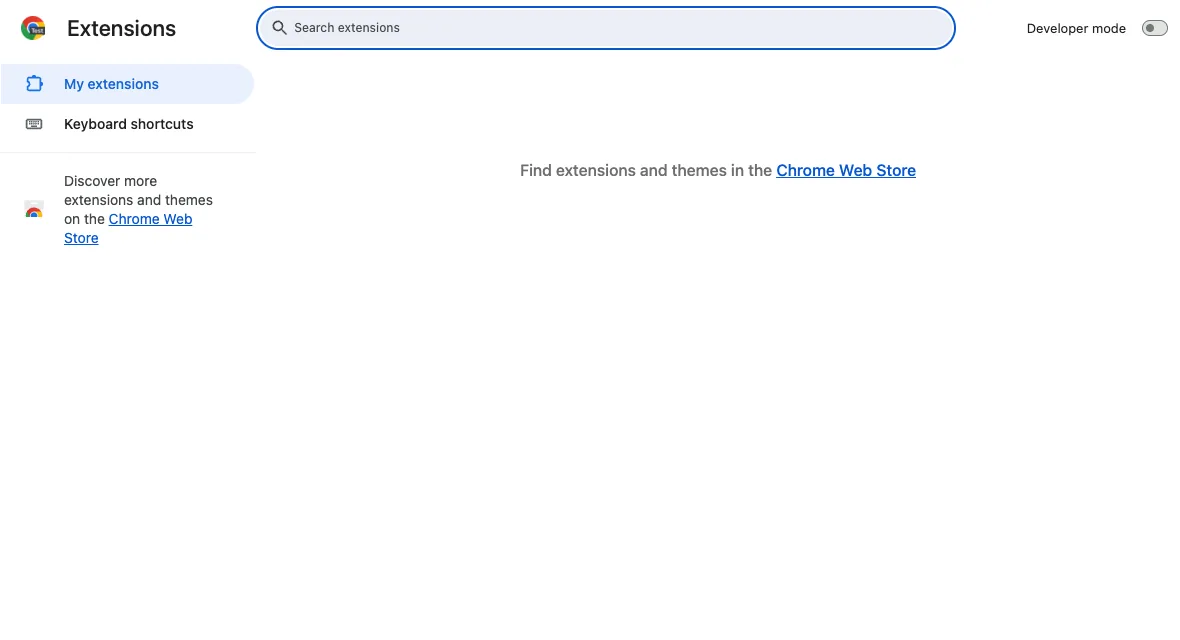
Step 3
Top right corner. Click the switch. Three new buttons appear.
Congratulations. You are a developer now. This is how it starts. Next week you'll have opinions about tabs versus spaces.
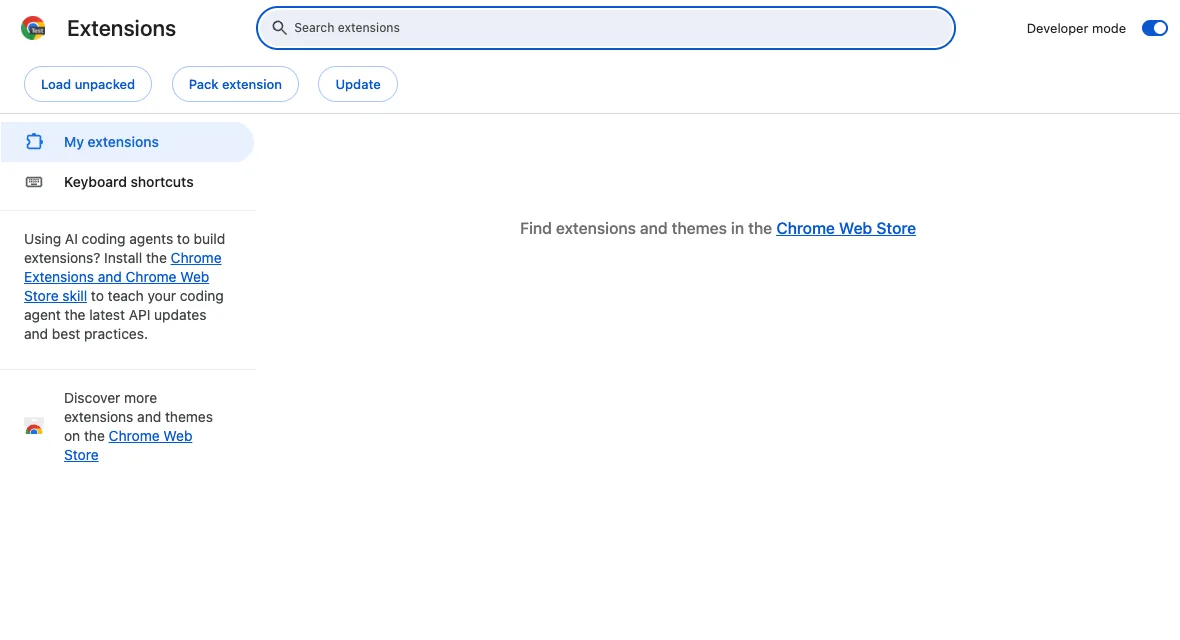
Step 4
Choose the doomscroll-stopper folder itself (the one with manifest.json inside), then click Select. Not the zip. The folder.
A card called Doomscroll Stopper shows up. That's it. It's installed.
If Chrome says "Manifest file is missing", you picked the folder around it. Go one level in.
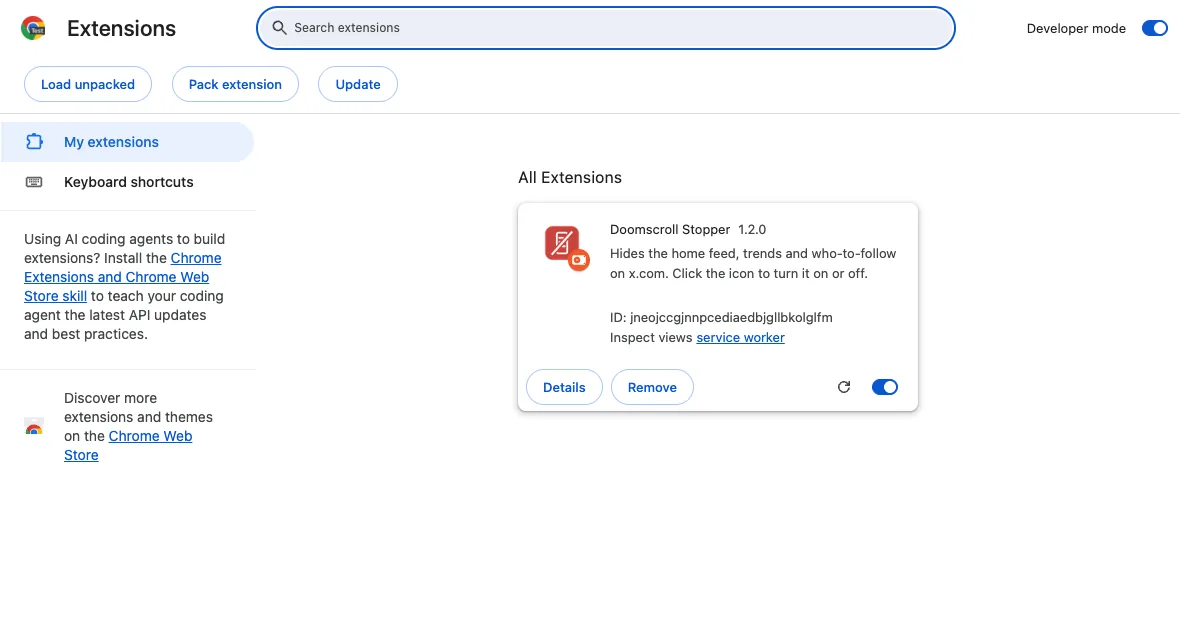
Step 5
Click the puzzle piece in Chrome's toolbar and hit the pin next to Doomscroll Stopper. Now the on/off switch lives up there.
Close any open x.com tabs and open x.com/home. Enjoy the silence.
One click turns it off (grey OFF badge). Use this power responsibly, for example to check one notification, not to "just see what's happening".
Doomscroll StopperQuestions you're about to ask
It's four small files. Open them in any text editor and read the whole thing in two minutes. Nothing leaves your computer. The only thing it saves is whether it's on or off.
Because Leon built it in one prompt. If enough people use it, we'll put it there.
No. On your phone the extension is called "delete the app". Free to install. Hard to keep installed.
Not yet. Chrome, Brave, Edge, Arc and other Chromium browsers only.
Either you moved or deleted the folder (put it back, or load it again from the new spot), or X changed its website. Download the latest version from this page.
No. We're Founder Funnel, a growth agency. We like X a lot. We just like it more when you're posting on it than reading it at 2am.
Scroll less. Post more. Posting is how founders get customers. Scrolling is how founders get opinions about sourdough.
Go to chrome://extensions and click Remove on the Doomscroll Stopper card. We won't be offended. We'll be a little offended.
Claude is waiting
It answered you 46 minutes ago. It's not mad. It's just disappointed.
Download Doomscroll StopperFree forever. Works in Chrome, Brave, Edge and Arc.
Made by Founder Funnel. We help founders get customers from content they make in about an hour a week. Spend the 47 minutes you just saved on a post instead. See how we do it